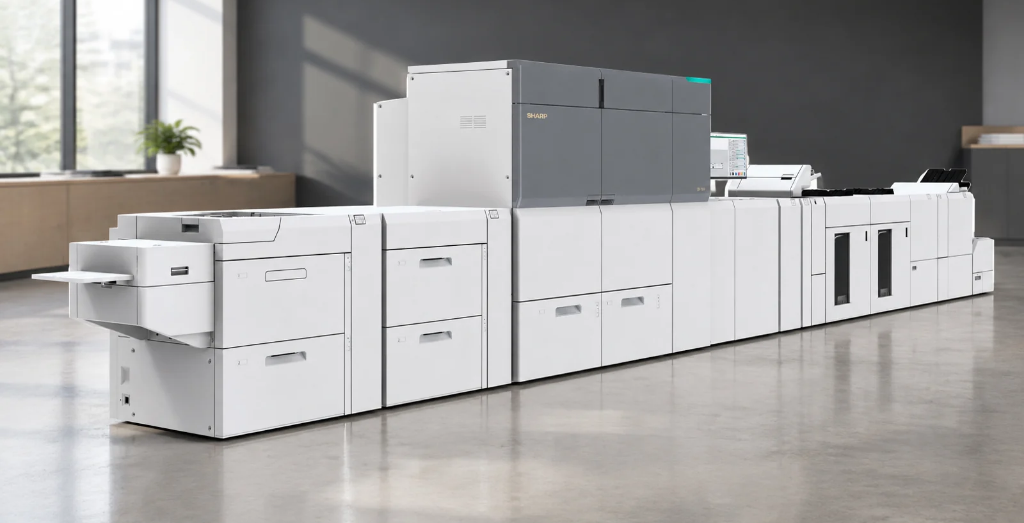
Businesses that produce high volumes of printed materials need equipment that can deliver consistent quality, efficient production, and flexibility across different types of jobs. A Sharp digital press can help meet these demands with capabilities designed for professional print environments, including marketing materials, brochures, booklets, and other specialized applications.
With options for different production needs, businesses can evaluate print speed, color capabilities, media handling, and finishing features to find the right fit. Understanding what Sharp digital presses can do helps organizations make informed decisions about production printing equipment and its role in their operations.
Key Takeaways
- Sharp digital presses support professional production printing
- Capabilities vary by model, including speed, color, and media options
- Specialized configurations handle a wider range of print jobs
- Fiery workflow tools automate tasks and improve efficiency
- Inline finishing reduces manual handling and speeds up production
What Are Sharp Digital Presses?
Sharp digital presses are production printing systems designed to handle higher print volumes and more demanding applications than standard office multifunction printers. While office printers are typically used for everyday documents, digital presses support professional printing projects such as brochures, catalogs, booklets, and marketing materials. When evaluating a Sharp digital press, businesses should consider factors such as print speed, monthly duty cycle, image quality, media compatibility, and finishing options.
Digital printing also makes short runs, on-demand jobs, and frequent content updates more practical without requiring traditional printing plates. By matching equipment capabilities to current print volumes, application requirements, and future growth, businesses can choose a production printing solution that meets their needs rather than focusing on speed alone.
What Types of Materials Can Sharp Digital Presses Produce?
Sharp digital presses can produce a wide range of business and commercial print materials, from everyday documents to professional marketing collateral. The types of materials each press can handle depend on its media capacity, paper weight limits, sheet sizes, and configuration. Choosing the right equipment starts with understanding what you plan to print and the finish you want to achieve.
When evaluating a Sharp digital press, consider these common applications and material requirements:
- Marketing materials: Brochures, flyers, postcards, and promotional pieces
- Publications: Newsletters, booklets, catalogs, and other multi-page documents
- Business documents: Reports, presentations, manuals, and informational materials
- Heavyweight media: Thicker paper stocks for covers, cards, and specialty print projects
- Coated and specialty stocks: Materials that require specific media handling or printing capabilities
Before selecting a press, verify that the model supports your required paper weights, sheet sizes, coatings, and specialty substrates. These specifications vary by model and configuration and can affect both print quality and production efficiency.
How Do Color Capabilities and Print Quality Affect Production Results?
Color accuracy, image detail, text clarity, and consistency all influence the quality of professional printed materials. Standard four-color printing uses cyan, magenta, yellow, and black (CMYK) to reproduce a wide range of colors, while specialized six-color configurations can expand creative possibilities for certain applications. For example, the Sharp BP-1200S 6-color production printing system supports specialty color effects that can help businesses create distinctive marketing materials. Color management, calibration, and consistent print settings also help maintain reliable results across repeat jobs.
When evaluating color capabilities and print quality, consider how the following features support production needs:
| Feature | How It Supports Production Printing |
| Color accuracy | Helps reproduce brand colors consistently across marketing materials and business publications. |
| Image resolution and detail | Supports sharp text, clear graphics, and detailed photographs for professional-looking output. |
| Four-color printing | Uses CMYK to produce a broad range of colors for everyday commercial print applications. |
| Six-color printing | Adds specialized color capabilities that can support creative effects and expanded application options, depending on the press configuration. |
| Color management and calibration | Helps maintain consistent output across repeat jobs and production runs. |
| Consistent print settings | Reduces variations between jobs and helps businesses produce reliable results for customer-facing materials. |
Choosing a press with the right color capabilities helps businesses meet their quality requirements, maintain brand consistency, and produce professional materials that align with their customers’ expectations.
How Do Fiery Workflow Tools Improve Production Printing Efficiency?
Workflow software and digital front ends help businesses prepare, process, and manage production print jobs more efficiently. Fiery workflow tools can automate repetitive prepress tasks, organize print queues, and simplify recurring jobs. When paired with compatible Sharp digital presses, these tools can help operators maintain consistent output, reduce manual work, and coordinate production more effectively.
Key benefits of Fiery workflow tools include:
- Automated prepress: Simplifies file preparation and reduces repetitive setup tasks.
- Job management: Organizes print queues and helps operators prioritize production jobs.
- Color consistency: Supports color management to maintain reliable output and reduce avoidable reprints.
- Faster repeat jobs: Uses saved settings and presets to simplify recurring print projects.
- Improved coordination: Helps operators manage multiple jobs and keep production moving efficiently.
Available features and compatibility depend on the Fiery software, digital front end, and Sharp press configuration. Businesses should verify these requirements when evaluating a production printing solution.
How Can Inline Finishing and Other Options Expand Production Capabilities?
Finishing transforms printed sheets into completed materials that are ready for distribution or use. Depending on the press model and configuration, finishing options may include stapling, folding, booklet making, hole punching, and trimming. Inline finishing equipment performs selected tasks as part of the printing process, reducing manual handling and helping businesses complete jobs more efficiently.
For projects that require specialized output, compatible external finishing equipment can provide additional capabilities beyond those built into the press. When choosing a Sharp digital press, businesses should evaluate finishing requirements alongside print volume, media compatibility, available space, and operator workflow to find a solution that supports their production needs.
Sharp Digital Press Questions
What is the difference between a Sharp digital press and a commercial production printer?
Explain that the terms can overlap, as a digital press is a type of production printing system. Clarify that buyers should focus on the equipment’s intended workload, print speed, media handling, color capabilities, finishing options, and supported production requirements rather than relying on terminology alone.
Are Sharp digital presses suitable for short print runs?
Discuss how digital production printing can be useful for short runs because jobs can be prepared without traditional printing plates. Explain how this can benefit businesses that produce limited quantities, update content frequently, or need materials on demand, while noting that cost-effectiveness depends on the job’s specifications and volume.
Can Sharp digital presses print on heavy or specialty paper?
Explain that media compatibility varies by model and configuration. Discuss how supported paper weights, sheet sizes, coatings, and specialty substrates influence which applications a press can handle, and recommend verifying manufacturer specifications for the intended materials.
How much space does a Sharp digital press require?
Explain that installation requirements depend on the press model, its configuration, and any connected feeding or finishing equipment. Note that businesses should consider equipment dimensions, service access, ventilation requirements where applicable, electrical needs, and material storage when planning a production area.
How should a business choose the right Sharp digital press?
Discuss how buyers should evaluate expected print volume, required production speed, color and image-quality needs, media compatibility, finishing requirements, workflow software, and budget. Explain that reviewing current printing demands alongside anticipated growth can help businesses select equipment that supports their operational goals.
Choosing Sharp Digital Presses for Your Production Needs
Sharp digital presses offer production printing capabilities that can help businesses create professional marketing materials, business documents, booklets, and other specialized printed products. By evaluating print quality, media compatibility, workflow automation, and finishing options, organizations can identify equipment that supports their production requirements and improves operational efficiency. Understanding these capabilities is an important step toward choosing a production printing solution that aligns with current workloads and future business needs.
As a production print equipment provider in Houston, we help organizations evaluate printing technology based on their applications, production goals, and operational requirements. From Sharp digital presses and office multifunction printers to managed print services and ongoing support, our team can help you identify the right equipment for your business.
If you’re considering an upgrade to production printing equipment, request a quote today to find a Sharp digital press and printing solution that fits your needs.

Kimberly Gonzalez founded Platinum Copier Solutions in 2007 after building her career in the copier and office equipment industry, which began at just 19 years old, selling Xerox copiers. Her early hands-on experience sparked a lifelong passion for document systems and office technology, ultimately inspiring her to launch her own company. As the 100 percent owner, Kimberly continues to lead Platinum Copier Solutions with a clear vision and commitment to quality.