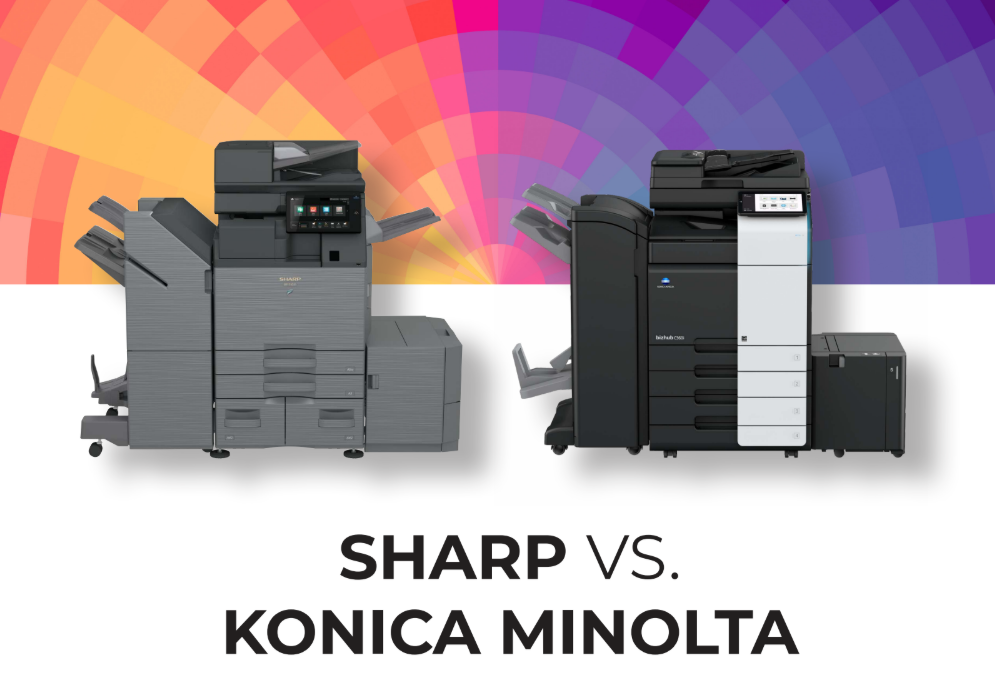
Choosing the right multifunction printer affects productivity, security, and overall office efficiency. This comparison of Sharp BP series copiers and equivalent Konica Minolta Bizhub C-series models is designed to help businesses understand which option delivers better real-world value.
Sharp BP series devices focus on streamlined workflows, fast scanning, and strong built-in features that support everyday office tasks. Konica Minolta Bizhub models are also widely used in business environments, but often rely more on optional upgrades to reach similar functionality.
By comparing these systems across usability, performance, security, and total cost, this guide highlights the practical differences that matter most when selecting office print technology.
Key Takeaways
- Sharp BP series focuses on out-of-the-box productivity and security features
- Konica Minolta models often require optional upgrades for similar functionality
- Sharp emphasizes faster scanning, AI-assisted workflows, and usability enhancements
- Both brands target enterprise office environments, but the value structure differs
- Total cost of ownership depends heavily on included vs optional features
Overview of Sharp BP Series vs Konica Minolta Bizhub C-Series
Sharp BP series and Konica Minolta Bizhub C-series are both positioned as enterprise-grade multifunction printers designed to handle demanding office workloads. They are commonly compared because they serve similar business environments but differ in how features are included and how workflows are supported across each platform.
Market Positioning
Sharp BP series and Konica Minolta Bizhub C-series both compete in the enterprise multifunction printer market, targeting organizations that need reliable, high-volume document handling. Each brand focuses on delivering scalable office solutions designed to support printing, scanning, and document management in busy environments.
Target Users
These systems are typically used in mid-sized to large office settings where multiple departments share print infrastructure. They are designed for teams that depend on consistent uptime, secure document processing, and efficient workflows across daily operations.
How These Models Are Compared
Most comparisons between Sharp and Konica Minolta are based on spec-to-spec configurations within similar performance tiers. This helps businesses evaluate real differences in capability rather than just brand reputation.
- Print and scan speed under duplex workloads
- Document feeder capacity and reliability
- Standard vs optional feature availability
- Security and access control tools
- Total cost when fully configured
- Workflow and usability efficiency in daily use
Print, Scan, and Workflow Performance Differences
Print, scan, and workflow performance are key differentiators between the Sharp BP series and the Konica Minolta Bizhub C-series devices. Both platforms are designed for business environments, but they differ in scan speed, automation, and how efficiently they handle high-volume document workflows.
Performance Comparison
| Feature | Sharp BP Series | Konica Minolta Bizhub C-Series |
| Duplex Scan Speed | Up to 300 ipm on select models, optimized for high-volume scanning | Up to ~280 ipm depending on model configuration |
| Document Feeder Type | 300-sheet single-pass duplexing feeder for faster, one-pass scanning | 300-sheet duplex feeder, configuration varies by model |
| First Copy Out Time | Approximately 4–7 seconds, depending on the model | Approximately 4–6 seconds, depending on the model |
| AI Scan Optimization | Standard on select BP models, auto-adjusts size, skew, compression, and color | Limited or optional, depending on configuration |
| Workflow Automation | Built-in tools for scan routing, presets, and cloud integration | Available, but more dependent on optional software or add-ons |
Workflow Interpretation
In daily use, faster duplex scanning helps reduce the time required to process large document batches, especially in departments that rely heavily on scanning, such as HR, accounting, and operations. Even small improvements in first copy out time can improve efficiency in offices that handle frequent short print jobs throughout the day.
Single-pass scanning technology improves reliability by reducing paper handling and eliminating the need for multiple passes through the feeder. This supports smoother high-volume workflows and reduces the likelihood of jams or misfeeds.
AI-based scan optimization further streamlines workflows by automatically adjusting settings like file compression, skew correction, and document sizing. This reduces manual setup time and helps users complete tasks more consistently with less training.
Usability and User Interface Experience
User experience plays a major role in how efficiently employees interact with multifunction printers on a daily basis. Both the Sharp BP series and the Konica Minolta Bizhub C-series devices are designed to simplify common tasks, but they differ in interface design, workflow structure, and data entry tools.
Control Panel and Touchscreen Design
- Sharp BP series uses a tablet-style touchscreen for more intuitive navigation
- Simplified layout helps reduce time spent searching through menus
- Konica Minolta uses a more traditional interface structure, depending on the model
- Both support customizable home screens for frequent tasks
Scan and Copy Workflow Simplicity
- Easy Copy and Easy Scan style workflows reduce steps for common jobs
- Preset functions help standardize repetitive tasks across departments
- Quick-access shortcuts improve speed for walk-up users
- Designed to reduce training time for everyday operations
Data Entry and Authentication Tools
- Sharp BP series includes a retractable keyboard for faster manual entry
- Built-in keyboard improves efficiency for scan destinations and login tasks
- Reduces reliance on on-screen typing for complex data entry
- Helps streamline onboarding for new users in shared office environments
Security and Data Protection Features
Security is a critical consideration for any enterprise multifunction printer, especially in environments handling sensitive business, financial, or client data. Both Sharp BP series and Konica Minolta Bizhub C-series devices offer layered security tools, but they differ in how many protections are included as standard versus optional add-ons.
Security Feature Comparison
| Security Feature | Sharp BP Series | Konica Minolta Bizhub C-Series |
| BIOS Integrity Check | Standard | Available on select models |
| Firmware Attack Prevention | Standard | Available on select models |
| Secure Print Release | Standard (serverless option available) | Available, often dependent on configuration |
| TPM Encryption | Standard | Standard on most enterprise models |
| Active Directory Integration | Standard support | Standard support |
| Antivirus Protection | Optional (e.g., third-party integration) | Optional, depending on setup |
| Data Wipe / End-of-Lease Tools | Standard secure erase with reporting | Available, may vary by model |
How Each Brand Handles Endpoint Security
- Sharp emphasizes built-in protections that operate at the device firmware level
- Security controls are designed to run continuously in the background without user input
- Konica Minolta also provides strong enterprise security features, but implementation can vary by configuration
What Multi-Layered Security Means in Practice
- Combines hardware-level, firmware-level, and network-level protections
- Helps protect against unauthorized access and malware intrusion attempts
- Supports secure printing, encrypted storage, and controlled user authentication
Optional vs Standard Security Gaps
- Sharp includes more advanced security features as standard on many BP models
- Konica Minolta often requires optional packages or higher-tier configurations for similar coverage
- Feature availability can vary significantly depending on the exact model and setup
- This impacts the total cost and how fully secured a device is out of the box
Total Cost of Ownership and Value Comparison
Cost and configuration breakdown
| Cost / Feature Category | Sharp BP Series (example models) | Konica Minolta Bizhub C-Series |
| Base machine cost | Lower base MSRP in comparable configs | Higher base MSRP in most configs |
| Paper capacity config | High capacity standard (up to ~6,300 sheets) | High capacity, often requires matching add-ons |
| Finisher options | Available optional inner/stacking finishers | Comparable finishers often priced separately |
| Keyboard for data entry | Integrated retractable keyboard (standard) | External keyboard kit required (add-on) |
| Color management (PANTONE) | Standard licensing included | Often requires optional print controller |
| Secure print release | Serverless Print Release standard | Typically optional or limited depending on setup |
| Data protection/wipe tools | End-of-lease wipe + report standard | Often optional or dependent on configuration |
What these differences mean in real use
Sharp’s advantage in total cost of ownership is driven less by the sticker price and more by what is included out of the box. Many capabilities that are standard on Sharp devices require optional hardware or licensing in comparable Konica Minolta configurations, which increases the real deployment cost.
This difference shows up most clearly in three areas:
- Upfront configuration costs: Konica Minolta systems often require add-ons like keyboards, controllers, or finishing modules to match baseline Sharp functionality
- Workflow efficiency costs: Built-in tools on Sharp reduce training time, setup complexity, and user friction
- Operational consistency: Standardized features like secure print release and scan automation reduce reliance on IT intervention
Over time, these factors influence ROI through lower configuration overhead, fewer optional purchases, and more consistent day-to-day productivity across users.
Sharp vs Konica Minolta Copier FAQs
Which is better: Sharp or Konica Minolta copiers?
There is no universal winner because it depends on the specific workflow and configuration. Sharp BP series models tend to include more advanced productivity and security features as standard, which can reduce the need for add-ons. Konica Minolta can be competitive in certain configurations, but it often depends on how fully the system is built out.
Do Sharp BP series printers require fewer upgrades?
Yes, in many cases, they do require fewer upgrades to reach full functionality. Features like secure print release, advanced scanning, and data protection tools are often included as standard on Sharp devices. This can simplify deployment and reduce the need for additional hardware or licensing.
Are Konica Minolta Bizhub printers more affordable upfront?
In some configurations, Konica Minolta models may show a lower initial purchase price. However, that base cost does not always include the same feature set as comparable Sharp units. Once optional upgrades are added, the total system cost can increase significantly depending on requirements.
Which brand is better for high-volume scanning?
Sharp BP series models are generally positioned for higher-speed, high-volume scanning environments. Their duplex single-pass feeders and scan optimization features are designed to support heavy document workflows. This can improve efficiency in offices where scanning is a daily, high-demand task.
Do both support cloud printing?
Yes, both Sharp and Konica Minolta devices support integration with major cloud platforms. This typically includes services like Microsoft 365, OneDrive, SharePoint, and Google Drive. The exact features and ease of setup can vary depending on the configuration and software options selected.
Comparing Sharp vs Konica Minolta Copiers
Both Sharp and Konica Minolta offer capable enterprise multifunction printers that can support demanding office environments. The key difference is that Sharp BP series models typically include more advanced productivity, scanning, and security features as standard, which can reduce reliance on add-ons and simplify overall workflow management. When comparing systems, businesses should focus on the total cost of ownership rather than the base purchase price, since optional upgrades and configuration requirements can significantly impact long-term value.
Platinum Copier Solutions helps businesses select, deploy, and manage office printing and document technology based on real operational needs rather than just specifications. The focus is on aligning the right multifunction printer setup with workflow demands, budget considerations, and long-term efficiency goals so organizations can avoid overpaying for unnecessary add-ons or under-equipping their teams.
If you are evaluating Sharp or Konica Minolta copiers for your office, request a quote from our experts today. A quick consultation can help you compare configurations side by side and identify the most cost-effective setup for your business environment.

Kimberly Gonzalez founded Platinum Copier Solutions in 2007 after building her career in the copier and office equipment industry, which began at just 19 years old, selling Xerox copiers. Her early hands-on experience sparked a lifelong passion for document systems and office technology, ultimately inspiring her to launch her own company. As the 100 percent owner, Kimberly continues to lead Platinum Copier Solutions with a clear vision and commitment to quality.