Getting Started on MICAS Setup
We’ll need the machine’s IP address before we begin.
At the copier’s touch panel:
- Tap System Information and write down the IP address and take it to a computer.
- Type the IP address into the address bar of a web browser to launch the web GUI for the Sharp MFP.
Setup MICAS on Sharp MFP Web GUI
- Login as administrator. The default password is admin.

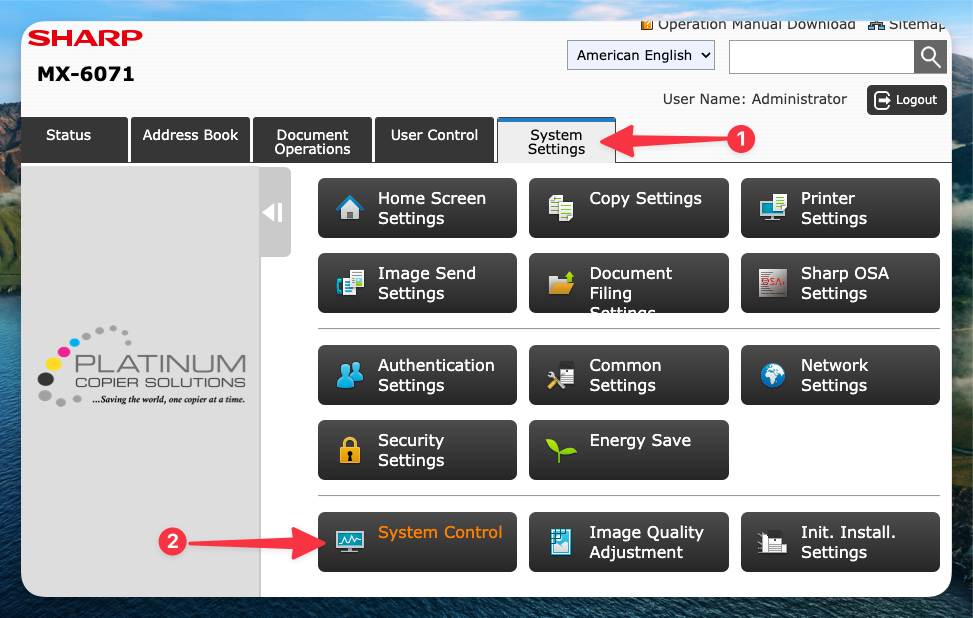
- Click the System Settings tab, then click System Control.
- Click E-mail Alert and Status on the left menu, then scroll down and enter remote@my-sharp.com in the Dealer E-mail Status Message List and set the schedule to Daily – Every 1 Day.
- Scroll down to the bottom of the page and click the blue Submit button to store the settings.