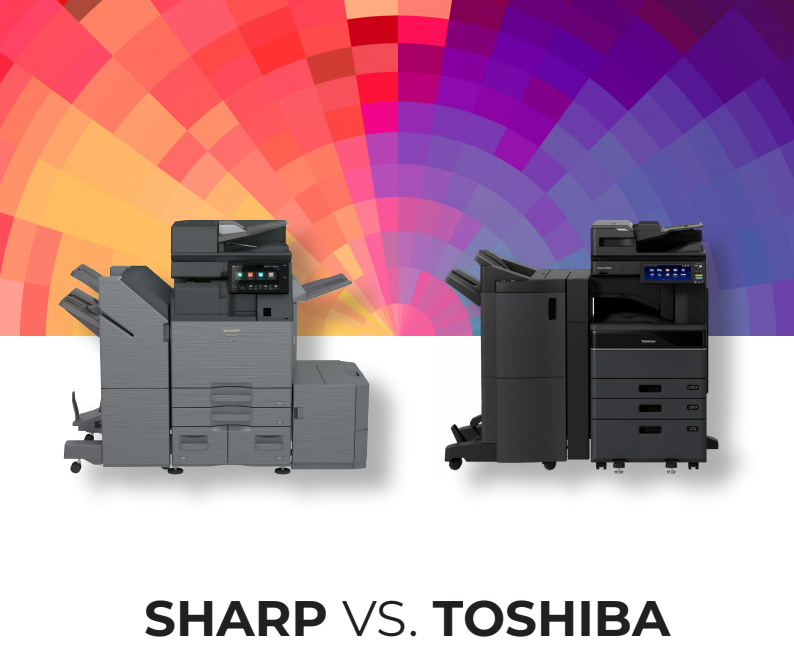
Selecting a multifunction printer influences how efficiently information moves through an office, from scanning and sharing documents to maintaining security across daily workflows. A Sharp vs Toshiba comparison is less about feature lists and more about how each system supports different ways of working. Sharp BP series devices are often associated with simplifying everyday document tasks, while Toshiba e-STUDIO systems tend to align with more structured, IT-directed environments. The differences become most noticeable when evaluating usability, workflow design, security approach, and long-term operating cost.
Key Takeaways
- Sharp is designed to reduce steps in everyday print and scan workflows
- Toshiba is commonly used in environments with structured IT oversight and standardized processes
- Sharp prioritizes ease of use across varied employee skill levels
- Toshiba tends to perform well in controlled, predictable office environments
- Total cost is influenced heavily by how much functionality is included upfront versus configured later
Sharp BP Series vs Toshiba e-STUDIO Series Overview
Sharp BP series and Toshiba e-STUDIO systems both operate in the enterprise multifunction printer space, supporting organizations that depend on consistent document handling across daily operations. While they serve similar office environments, they differ in how workflow control is implemented and how users interact with core device functions.
Both platforms are commonly found in:
- Mid-sized to large office environments
- Departments with shared printing and scanning infrastructure
- Organizations requiring consistent uptime and document reliability
Where they diverge is in operational design:
- Sharp BP series: built around reducing friction in everyday tasks and supporting mixed-user environments
- Toshiba e-STUDIO series: designed for environments that prioritize structured workflows and controlled device usage
Typical User Environments
- Offices with varied employee skill levels using shared devices
- IT-managed environments with standardized processes
- Departments with different levels of scanning and print intensity
- Organizations balancing flexibility vs procedural consistency
How These Platforms Are Evaluated
Rather than focusing on brand reputation, comparisons typically center on how each system behaves under real operational conditions:
| Evaluation Area | Sharp BP Series Focus | Toshiba e-STUDIO Focus |
| Workflow structure | Simplified, task-reduction approach | Standardized, controlled execution |
| User interaction | Designed for quick access and minimal steps | Menu-driven, structured navigation |
| Scan performance | High-speed with automation emphasis | Stable performance in consistent workflows |
| Feature delivery | More included in base configuration | More dependent on configuration choices |
| Security model | Integrated, device-level protections | Policy-driven, IT-managed controls |
| Operational impact | Reduced training and user friction | Predictable behavior across environments |
Core Comparison Lens
When evaluating Sharp vs Toshiba systems, the key differences are less about raw capability and more about how each system is designed to function inside an office:
- Workflow behavior: adaptive simplification vs structured consistency
- User dependency: minimal training vs defined usage patterns
- System flexibility: mixed-user adaptability vs controlled deployment models
- Operational emphasis: speed of task completion vs process standardization
Print, Scan, and Workflow Performance Differences
Performance in Sharp vs Toshiba environments is best understood through how each system handles document movement during repeated daily use. Rather than focusing only on raw speed metrics, the key difference is how efficiently each platform processes tasks when multiple users, mixed job types, and varying scan demands are involved.
Performance Comparison Snapshot
| Feature | Sharp BP Series | Toshiba e-STUDIO Series |
| Duplex Scan Speed | High-speed scanning optimized for heavy batch use | Strong performance with emphasis on consistency |
| Document Feeding System | Single-pass feeding designed for faster job completion | Multi-pass or standard feed depending on model |
| First Copy Response | Fast start-up for quick walk-up tasks | Stable response focused on controlled environments |
| Workflow Automation | Built-in task reduction and scan routing tools | More dependent on configured workflows |
| Scan Processing Tools | Automated adjustments for common scan errors | More structured, preset-based handling |
Real-World Workflow Behavior
In daily office use, performance differences show up less in isolated speed tests and more in how each device handles repeated, back-to-back tasks across multiple users.
- Sharp systems reduce interaction steps between scan jobs, which helps in environments where devices are used continuously throughout the day
- Toshiba systems tend to maintain consistent processing patterns, which supports environments where workflows are predictable and standardized
- High-volume scanning environments benefit from fewer manual adjustments, especially when documents vary in size or quality
- Structured environments benefit from repeatable workflows that behave the same way across departments and users
Operational Efficiency Impact
The performance difference becomes most noticeable in how much user input is required during routine tasks:
- Sharp: focuses on minimizing manual setup between jobs, reducing friction in mixed-use environments
- Toshiba: emphasizes predictable execution, which supports controlled workflows with fewer variations
- Offices with fluctuating scan volume benefit from reduced task repetition and faster recovery between jobs
Usability and User Interface Experience
Both Sharp BP series and Toshiba e-STUDIO systems are designed for business use, but they take different approaches to how users interact with the device. Sharp focuses on simplifying access to common tasks, while Toshiba leans more toward structured, menu-based navigation that supports controlled environments. Key usability differences include:
- Sharp uses a tablet-style touchscreen with faster access to core functions
- Toshiba relies more on layered menus and step-based navigation
- Sharp emphasizes simplified scan and copy workflows with fewer steps
- Toshiba is better suited for standardized, repeatable office processes
- Both support customizable shortcuts and preset job configurations
In day-to-day use, Sharp tends to reduce the number of actions needed to complete common tasks, which can improve speed in shared office environments. Toshiba’s structure works well in settings where workflows are tightly defined and consistency across users is the priority.
Security and Data Protection Features
Security is a core requirement for any enterprise multifunction printer, especially in environments handling confidential documents and shared network access. Both Sharp BP series and Toshiba e-STUDIO devices include enterprise-grade protections, but they differ in how security functions are built into the system and how much depends on configuration.
Security Architecture Comparison
Sharp and Toshiba take different approaches to how security is structured across the device environment.
- Sharp BP series emphasizes a layered, device-integrated security model
- Toshiba e-STUDIO systems typically rely on a combination of built-in controls and configurable security options
- Both include protections for firmware integrity and unauthorized system access
- Sharp focuses on continuous protection at the device level with fewer dependencies on add-ons
- Toshiba environments often implement security through structured IT configuration and policy setup
Access Control and Authentication
User access management is essential in shared office environments where multiple departments interact with the same device.
- Both platforms support Active Directory integration for centralized user management
- Sharp typically offers simplified authentication setup with fewer configuration steps
- Toshiba environments often rely on more structured setup through IT-managed policies
- Secure print release is supported on both systems, but implementation varies by configuration
- User authentication methods include PIN, credentials, and network-based login options across both brands
Deployment and Security Consistency
How security features are deployed can impact long-term consistency and IT workload.
| Security Area | Sharp BP Series | Toshiba e-STUDIO Series |
| Core security features | More commonly included as standard | More dependent on configuration |
| Firmware protection | Built into baseline system architecture | Available depending on model setup |
| Secure print workflows | Typically enabled out of the box | May require setup or optional components |
| Deployment complexity | Lower setup dependency | Higher reliance on IT configuration |
| Security consistency across devices | More uniform by default | Can vary based on deployment choices |
Practical Impact in Real Environments
- Sharp reduces variability by including more security functions at the base system level
- Toshiba environments may require tighter IT oversight to ensure consistent security deployment
- Both platforms support enterprise compliance needs, but configuration strategy plays a bigger role in Toshiba setups
- Sharp tends to simplify rollout in multi-device environments where standardization is important
- Toshiba can be effective in organizations with strong centralized IT governance
Total Cost of Ownership and Value Comparison
Total cost of ownership (TCO) goes beyond the initial purchase or lease price. For both Sharp BP series and Toshiba e-STUDIO systems, long-term cost is shaped by how many features are included upfront versus how many require additional configuration, licensing, or hardware expansion.
Typical Cost Pattern
- Sharp BP series: More features included standard → fewer add-ons required
- Toshiba e-STUDIO series: Lower or similar base price → higher cost after configuration and optional upgrades
What Drives Cost Differences
Toshiba e-STUDIO systems may require additional software, hardware, or licensing to match a fully configured setup. These add-ons depend on workflow needs and can increase total cost beyond the base price.
- OCR functionality
- Print controllers for advanced output management
- Workflow automation tools
- Finishing options like stapling and folding
- Data entry accessories or keyboards
Sharp BP series includes more of these capabilities as standard, which reduces the need for upgrades. Toshiba configurations often depend more on how fully the system is expanded after installation.
Workflow Fit and Office Environment Alignment
The practical difference between Sharp BP series and Toshiba e-STUDIO systems often becomes clearest when viewed through the lens of daily workflow behavior. Both platforms are designed for enterprise use, but they align better with different operational styles depending on how structured or dynamic the office environment is.
Best Fit for Sharp Environments
Sharp BP series systems are typically better suited for offices that prioritize speed, flexibility, and frequent document handling across multiple users.
- Mixed-user environments where employees have varying technical skill levels
- Fast-paced workflows that rely on quick printing, scanning, and copying
- Offices with heavy scanning demands such as HR, finance, and operations teams
- Shared devices used frequently throughout the day by multiple departments
- Environments where reducing user steps improves overall productivity
Best Fit for Toshiba Environments
Toshiba e-STUDIO systems tend to perform well in more structured, controlled IT environments.
- Offices with centralized IT management and strict configuration standards
- Standardized workflows that do not vary significantly between departments
- Predictable usage patterns with consistent print and scan requirements
- Environments where device behavior is tightly governed by policy
- Organizations that prioritize procedural consistency over workflow flexibility
Choosing Based on Workflow Type
Selecting between Sharp and Toshiba is less about feature lists and more about how the office actually operates.
- Decision-making should be based on user behavior, not just technical specifications
- High variability in daily tasks generally favors Sharp’s more flexible workflow design
- Highly controlled environments often align better with Toshiba’s structured approach
- The right choice depends on whether efficiency or standardization is the primary goal
- Real-world usage patterns are more important than brand or model comparisons alone
Sharp vs Toshiba Copier FAQs
Which is better overall, Sharp or Toshiba copiers?
There is no universal winner because both platforms are designed for enterprise environments with different priorities. Sharp typically focuses on simplifying workflows with more built-in functionality and faster user adoption. Toshiba is often a better fit in environments where IT teams prefer tighter control and standardized device behavior across the organization.
Is Sharp better for high-volume scanning environments?
Sharp is generally strong in environments that rely heavily on scanning due to its high-speed duplex performance and single-pass document handling. This reduces the time needed to process large batches of documents and minimizes manual intervention. Offices with frequent scanning tasks often benefit from the efficiency gains and reduced bottlenecks.
Do Toshiba copiers require more configuration to match features?
In many cases, Toshiba systems may require additional configuration or optional components to match certain advanced workflow features. This can include scanning enhancements, automation tools, or expanded print management capabilities depending on the model. The result is a more customizable setup, but it may require more planning during deployment.
Which platform is easier for employees to learn?
Sharp is generally easier for end users to adopt because of its simplified touchscreen interface and guided workflow design. Common tasks like copying and scanning are more directly accessible, which reduces training time. Toshiba systems tend to follow a more structured navigation approach, which works well in environments with standardized processes but may take longer for new users to learn.
How do Sharp and Toshiba compare in terms of security?
Both Sharp and Toshiba offer enterprise-grade security features such as user authentication, encryption, and network protection. The main difference is that Sharp tends to include more of these protections as standard across its BP series devices. Toshiba often provides similar capabilities, but some features may depend on configuration or IT policy setup.
Which brand offers better long-term value?
Long-term value depends heavily on how the system is configured and used within the office. Sharp often delivers more predictable total cost of ownership because more features are included upfront, reducing reliance on add-ons. Toshiba can still be cost-effective in controlled environments, but overall value is closely tied to how many optional components are required to match functionality.
Comparing Sharp vs Toshiba Copiers
Both Sharp and Toshiba provide enterprise multifunction printers built for demanding office environments. Sharp BP series models typically include more productivity, scanning, and security features as standard, which can reduce the need for add-ons and simplify deployment. Toshiba e-STUDIO systems are often a strong fit for structured, IT-managed environments that prioritize standardized workflows and controlled configurations. The main comparison comes down to total cost of ownership, since optional features and setup choices can significantly affect long-term value.
Platinum Copier Solutions helps businesses choose and manage print systems based on real workflow needs, not just specifications. The focus is on matching the right configuration to daily operations, budget, and efficiency goals.
If you are comparing Sharp vs Toshiba copiers, request a quote today to review options and find the best fit for your office.

Kimberly Gonzalez founded Platinum Copier Solutions in 2007 after building her career in the copier and office equipment industry, which began at just 19 years old, selling Xerox copiers. Her early hands-on experience sparked a lifelong passion for document systems and office technology, ultimately inspiring her to launch her own company. As the 100 percent owner, Kimberly continues to lead Platinum Copier Solutions with a clear vision and commitment to quality.